 NOOP App Guide

Quick steps
- Choose your device below and tap Download. The file comes straight from NOOP's official GitHub page.
- Install it with the guide for your device: Android, iPhone or Mac.
- Open NOOP, tap Begin, and allow Bluetooth when asked.
- Close the official WHOOP app, put your strap on and pair it with NOOP.
- Wear it overnight. Your scores fill in over your first few nights, or right away if you import your WHOOP history.
What is NOOP?
NOOP is a free, independent app for WHOOP straps that works entirely on your own device. It reads a WHOOP 4.0, 5.0 or MG strap over Bluetooth, keeps everything in a database on your phone or Mac, and works out your recovery, strain, heart-rate variability (HRV) and sleep itself. You don't need a WHOOP account, and nothing goes to anyone's cloud.
NOOP exists for one reason: so that someone who owns a WHOOP strap can read their own data, from their own strap, on a device they control. It runs on Android, iPhone and Mac, and the three apps look and work the same way.
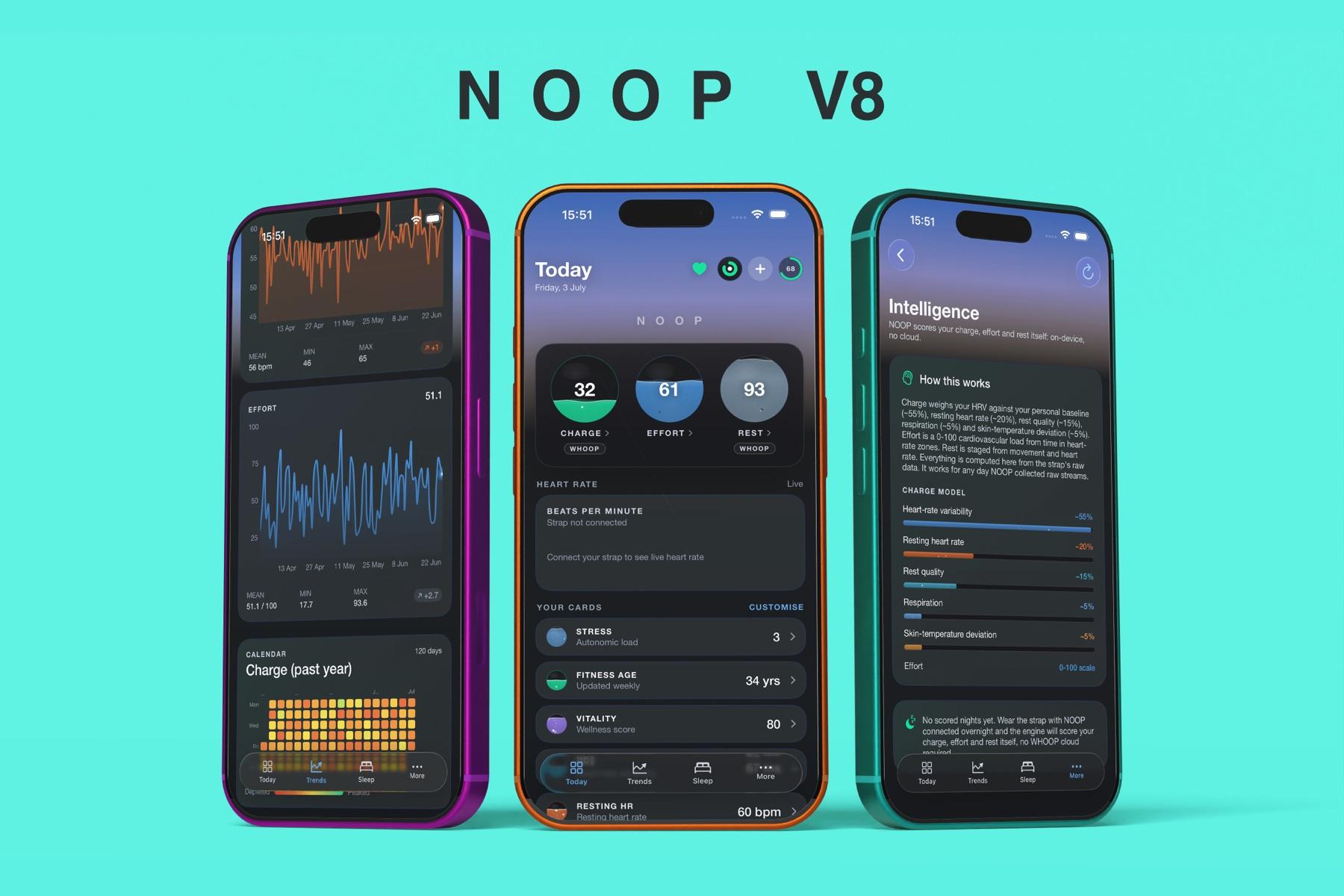
NOOP is built by volunteers on earlier community work, and it isn't connected to WHOOP, Inc. It's a capable work in progress: the app itself is upfront about which features are finished and which are still being built.
What NOOP can do
The same features are on Android, iPhone and Mac. Most of them work from imported data alone; the strap adds the live layer.
- Live heart rate: your heart rate the moment the strap connects, smoothed so it doesn't jump around, plus beat-to-beat intervals.
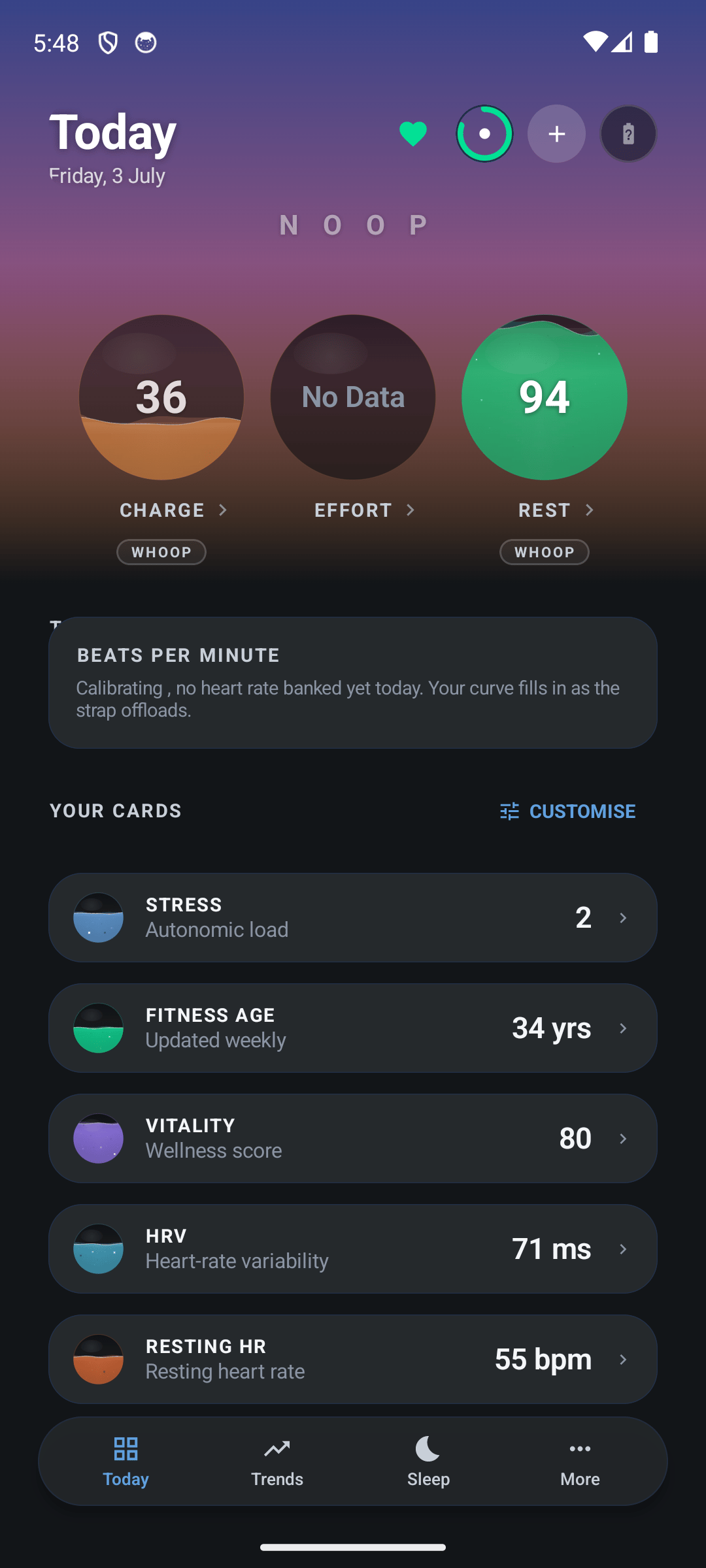
- Charge, Effort and Rest: NOOP's own recovery, strain and sleep scores, each from 0 to 100, worked out on your device from published sport science.
- Sleep: sleep stages, a hypnogram, efficiency, sleep debt and your past nights, not just last night.
- Trends, Explore and Compare: any metric over a week, a year or all time, two to four metrics side by side, and a one-page PDF report you can share with a coach or doctor.
- Breathe: breathing exercises paced by buzzes on your wrist, with your HRV shown before and after.
- Intervals: a silent HIIT timer. The strap buzzes at every switch between work and rest, so you never have to look at a screen.
- Bring your history: import your WHOOP export, Apple Health, Health Connect, and nutrition from Cronometer or MacroFactor, once.
- Illness early warning: a heads-up when your resting heart rate, HRV, temperature and breathing all drift the way they do before you get ill.
- Automations on Mac: lock your Mac when you take the strap off, double-tap the strap to run a Shortcut, and see your heart rate in the menu bar.
Which straps work with NOOP?
| Device | What you get |
|---|---|
| WHOOP 4.0 | Everything: live heart rate, history sync, Charge, Effort and Rest. This is the tested, fully supported strap. |
| WHOOP 5.0 / MG | Live heart rate works. Deeper sleep and recovery data is still being worked out, so some scores stay empty for now. |
| Oura Ring | Experimental, on iPhone and Android only. Overnight heart rate, sleep stages and skin temperature, with real limits. |
| Other heart-rate straps | Experimental. Live heart rate and HRV, but not WHOOP's sleep and recovery data. |
NOOP itself runs on Android 8.0 or newer, iOS 17 or newer or macOS 13 or newer (Apple silicon or Intel), each with Bluetooth.
Download the latest NOOP version
The version details below update by themselves within an hour of every new release.
| App name | NOOP (independent WHOOP companion app) |
|---|---|
| Latest version | 12.0.0 |
| Last updated | October 4, 2026 |
| Android file | NOOP-android-v12.0.0.apk (21.4 MB) |
| iPhone file | NOOP-ios-unsigned-v12.0.0.ipa (20.9 MB) |
| Mac file | NOOP-macos-v12.0.0.zip (30.5 MB) |
| Requires | Android 8.0 or neweriOS 17 or newermacOS 13 or newer |
| Works with | WHOOP 4.0 (full support), WHOOP 5.0 / MG (live heart rate, more coming) |
| Price | Free. No account, no subscription |
| Developer | NoopApp |
| License | Free for personal use (PolyForm Noncommercial 1.0.0) |
| Source code | github.com/ryanbr/noop |
Each button opens our download page, which starts the official file from NOOP's GitHub releases after a short countdown. On an iPhone you'll usually skip the download altogether and add NOOP's source to SideStore or AltStore instead, so it updates itself.
Which guide do you need?
Pick the device you'll use NOOP on. Each guide walks you through every screen, with a picture of each one and the button to tap circled in teal.
Once NOOP is installed, these guides cover the rest:
- How to pair your WHOOP strap with NOOP (7 min read)
- How to import your WHOOP data into NOOP (7 min read)
- NOOP features: every screen explained (8 min read)
- Charge, Effort and Rest: how NOOP's scores work (7 min read)
- Is NOOP private? How NOOP handles your health data (8 min read)
- NOOP not working? Fixes for every common problem (5 min read)
- NOOP FAQ: your questions, answered (8 min read)
- NOOP vs the WHOOP app: what's different? (4 min read)
Before you start
You'll need:
- A WHOOP strap you own. A WHOOP 4.0 gives you the full app; a 5.0 or MG gives you live heart rate for now.
- A phone or Mac that's new enough: Android 8.0 or newer, iOS 17 or newer or macOS 13 or newer, with Bluetooth.
- About ten minutes, and your strap charged.
- On iPhone only: a free Apple ID and, the first time, a Mac or Windows computer to set up SideStore or AltStore.
Install NOOP on Android
NOOP isn't on the Play Store, so you install the APK file yourself. Android asks you to confirm a couple of times; that's normal for any app from outside the store.
- Tap Download for Android above and open the file when it finishes.
- If Android says your browser can't install apps, tap Settings and turn on Allow from this source.
- Tap Install. If Play Protect warns you, tap More details, then Install anyway.
- Open NOOP and allow Nearby devices so it can find your strap.
Read the full Android guide with pictures, including what to do when there's no "Install anyway" button.
Install NOOP on iPhone
Apple doesn't allow NOOP in the App Store, so it's installed with SideStore or AltStore. These free tools sign the app with your own Apple ID, on your own phone. Once set up, they keep NOOP updated by themselves.
- Set up SideStore or AltStore on your iPhone (a one-time job that needs a computer).
- In its Sources tab, tap + and add NOOP's source:
https://raw.githubusercontent.com/ryanbr/noop/main/altstore-source.json- Tap FREE next to NOOP to install it.
- Turn on Developer Mode, trust your Apple ID in VPN & Device Management, and open NOOP.
Read the full iPhone guide with pictures, including the 7-day refresh and how to fix the common AltStore errors.
Install NOOP on Mac
- Tap Download for Mac above and open the
.zip. - Drag NOOP into your Applications folder.
- Open it. macOS will block it the first time because it isn't notarized. Go to System Settings → Privacy & Security and click Open Anyway.
- Allow Bluetooth when NOOP asks.
Read the full Mac guide with pictures, including the one-line Terminal fix.
Set up NOOP the first time
The first time you open NOOP, a short setup walks you through everything. Read each screen and tap Continue:
- Welcome: tap Begin.
- What NOOP does and What to expect: a quick, honest overview. WHOOP 4.0 is fully supported; 5.0 and MG are newer.
- A quick word before you connect: allow Bluetooth when your phone or Mac asks.
- Put your strap on: snug, sensor against your skin, charged, and close to your device.
- Find your strap: NOOP scans and pairs. When it says Bonded · streaming, you're connected. Close the official WHOOP app first, or the strap may refuse to pair.
- About you: your age, sex, height and weight, so heart-rate zones and calories start from the right numbers. Tap Save & continue.
- Bring your history: import a WHOOP export now, or skip it and do it later.
- Tap Enter NOOP.
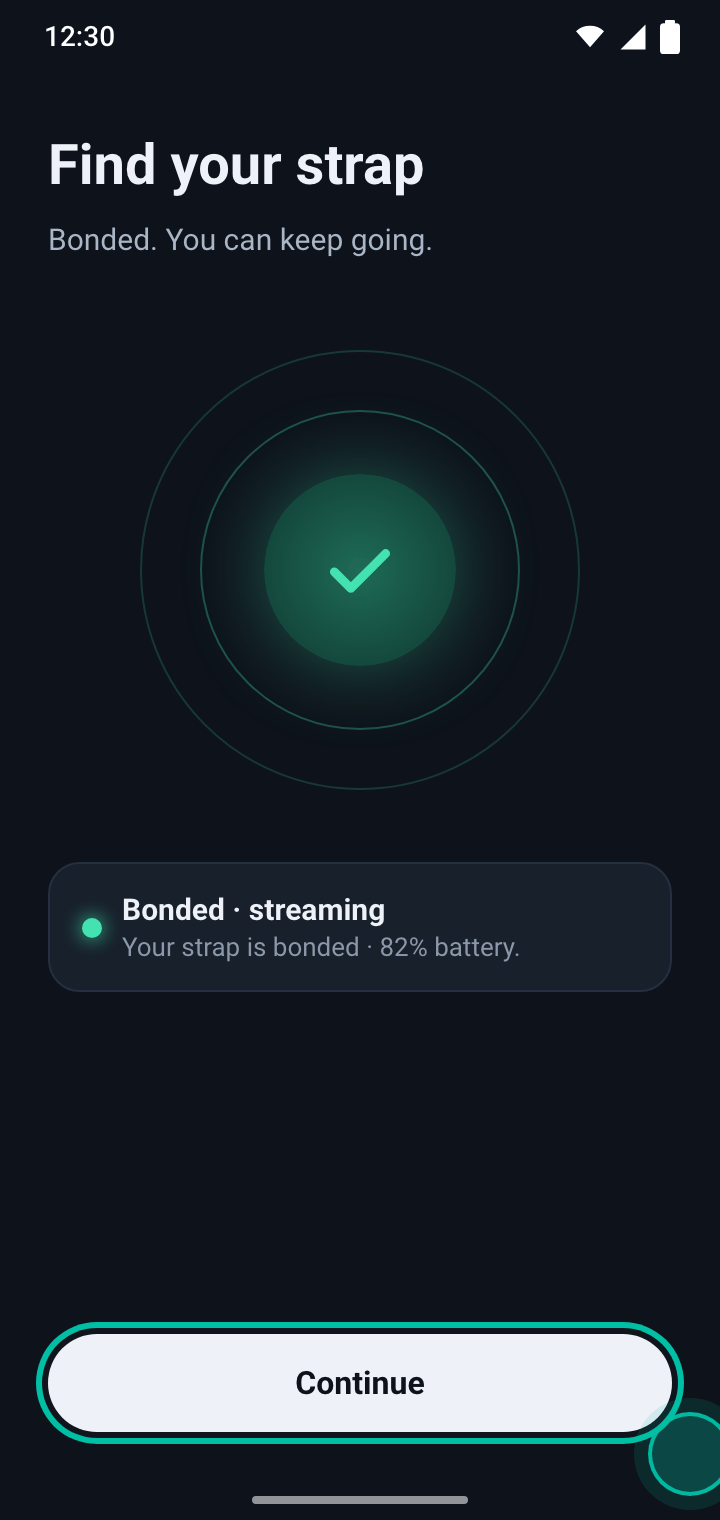
Pairing has its own guide, with the extra steps a WHOOP 5.0 or MG needs: Pair your WHOOP strap with NOOP.
What to expect in your first week
NOOP works out your scores against your own baseline, so like any recovery wearable it needs a little data first:
- Minute one: live heart rate shows as soon as the strap connects.
- First few minutes: the strap's stored data, roughly its last two weeks, comes across while it's nearby.
- Day one: Effort (strain) appears once you've worn the strap and it has synced.
- First night: Rest (sleep) appears in the morning.
- Nights two to four: Charge (recovery) shows Calibrating while NOOP learns your normal HRV. Don't tap Recalibrate baseline: it starts the count again.
- Two weeks in: your baselines settle and the scores sharpen.
In a hurry? Import your WHOOP export and your history fills in about a minute.
Charge, Effort and Rest: NOOP's three scores
NOOP gives you three daily scores, each from 0 to 100. They answer the same questions as other recovery wearables, using openly documented methods, and they're calculated on your device.
| Score | Answers | Mostly based on |
|---|---|---|
| Charge | How recovered are you today? | Your HRV against your own baseline, plus resting heart rate, last night's Rest, breathing and skin temperature |
| Effort | How hard did your heart work today? | Time spent in each heart-rate zone, on a scale where 100 is very rare |
| Rest | How restorative was your sleep? | How long you slept against what you need, plus efficiency, deep and REM sleep, and regular timing |
Charge needs a few nights to learn your normal HRV and shows Calibrating until then. How NOOP's scores work explains every input and what the colours mean.
Is NOOP private?
Privacy is the reason NOOP exists:
- No account, ever. There's nothing to sign up for and nothing to sign in to. NOOP never contacts WHOOP's servers.
- No cloud. NOOP has no server. Your strap data, imports and scores stay in one database file on your device.
- Works offline. Collecting from the strap and calculating your scores need no internet connection at all.
- No tracking. There's no analytics, no advertising ID and no crash reporting inside the app.
- One small check. Once a day NOOP reads a public version number to see if there's an update. It sends nothing about you, and you can turn it off.
- Extras stay off until you set them up: backups to a folder you choose, exports, and an optional AI Coach that uses your own AI key.
Because there's no cloud copy, your data lives only on your device. Make a backup before you switch phones or uninstall. Is NOOP private? lists every case where data can leave your device.
NOOP vs the WHOOP app
| NOOP | WHOOP app | |
|---|---|---|
| Price | Free | Paid membership |
| Account needed | No | Yes |
| Where your data is kept | On your device | WHOOP's servers |
| Source code you can read | Yes | No |
| Installs from the App Store / Play Store | No | Yes |
| Full WHOOP 5.0 / MG support | Not yet (live heart rate) | Yes |
| Official support from WHOOP | No | Yes |
The WHOOP app is the official, polished experience; NOOP trades some of that for ownership and privacy. Read the full comparison.
How to update NOOP
NOOP checks once a day whether a new version is out and tells you. It never installs anything by itself. To update:
| Device | How to update |
|---|---|
| Android | Download the new APK and install it over the old one. Your data stays. |
| iPhone | Nothing to do if you added NOOP's source: SideStore or AltStore installs updates when it refreshes. Or pull down on My Apps to check. |
| Mac | Download the new .zip, quit NOOP, and replace the app in Applications. You may need to click Open Anyway once more. |
What changed in each version is in NOOP's release notes on GitHub.
Common problems and fixes
| Problem | Fix |
|---|---|
| Android won't install the APK, or there's no Install anyway | Fix Play Protect blocks |
| iPhone says "Untrusted Developer" or won't open NOOP | Turn on Developer Mode and trust your Apple ID |
| NOOP stopped opening on iPhone after a week | Refresh it in SideStore or AltStore |
| Mac says NOOP "is damaged" or "Not Opened" | Open it from Privacy & Security, or use Terminal |
| The strap isn't in your Bluetooth settings | That's normal. WHOOP straps only show up inside apps like NOOP. Pair it from NOOP |
| WHOOP 5.0 / MG says "bond refused" | Free it from the WHOOP app and use pairing mode |
| Heart rate works but buzz, alarm or history don't | The strap isn't fully paired to this device. See the fix |
| Charge says Calibrating | Wear the strap for a few nights, or import your WHOOP export. Why it happens |
See every fix in one place, or ask on r/NoopBand or NOOP's Discord. To report a bug in the app itself, open an issue on NOOP's GitHub and attach your strap log.
Frequently asked questions
What is the NOOP app?
NOOP is a free, independent companion app for WHOOP straps. It connects to a WHOOP 4.0, 5.0 or MG strap over Bluetooth, stores everything on your own phone or Mac, and calculates its own recovery (Charge), strain (Effort) and sleep (Rest) scores on the device. It needs no WHOOP account and sends nothing to a cloud.
Is NOOP free?
Yes. NOOP costs nothing, has no subscription and no in-app purchases. Its code is published under the PolyForm Noncommercial 1.0.0 license, which lets anyone use, read and change it for personal and other non-commercial use.
Is NOOP the official WHOOP app?
No. NOOP is an independent project that isn't affiliated with, endorsed by or connected to WHOOP, Inc. It talks to a WHOOP strap you own over Bluetooth and never signs in to a WHOOP account or contacts WHOOP's servers.
Do I need a WHOOP membership to use NOOP?
NOOP never signs in to WHOOP, so it doesn't need a WHOOP account to work. You need a WHOOP strap you own. NOOP's developers ask that you only use it with your own device and not in breach of any agreement that applies to you, so check yours if you're unsure.
Is NOOP safe to install?
The app's full source code is public on GitHub, and every download button on this site points to NOOP's official GitHub releases. Your phone or Mac will still warn you when you install it, because NOOP is published anonymously without a paid Google or Apple developer account, so it isn't signed or notarized the way store apps are. The warning is about the missing signature, not about anything found in the file.
Why isn't NOOP on the Play Store or App Store?
Publishing in the stores needs a developer account tied to a real identity, and NOOP's developers keep the project anonymous. So it's sideloaded on every platform instead: an APK on Android, an IPA signed with your own Apple ID on iPhone, and a downloaded app on Mac.
Which straps work with NOOP?
WHOOP 4.0 is fully supported: live heart rate, history sync, and Charge, Effort and Rest. WHOOP 5.0 and MG stream live heart rate today, and their deeper sleep and recovery data is still being worked out. An Oura Ring and standard Bluetooth heart-rate straps work as experimental extras. See the table of what works.
Can I use NOOP and the WHOOP app at the same time?
Not with one strap at the same moment. A WHOOP strap keeps its secure Bluetooth link with one app at a time. While it's paired with NOOP, the official WHOOP app won't get its data, and the other way round. You can switch back by pairing it in the other app again. See Pair your WHOOP strap.
Does NOOP send my health data anywhere?
Not unless you ask it to. NOOP runs no server, no account and no tracking, and everything is stored on your own device. It checks once a day whether a newer version exists, which sends no health data and can be turned off. See Is NOOP private? for every detail.
Is there a Windows or Linux version of NOOP?
No. NOOP runs on Android 8.0 or newer, iPhones with iOS 17 or newer, and Macs with macOS 13 or newer. On a Windows or Linux computer, install it on your phone instead.
Why do NOOP's scores differ from the WHOOP app?
NOOP calculates its own scores on your device with published, documented methods. They usually move in the same direction as WHOOP's but won't match number for number. How NOOP's scores work explains each one.
Is NOOP a medical device?
No. Heart rate, HRV, recovery, strain, sleep stages and the other numbers are estimates worked out on your device. They aren't clinically validated, so don't use them to diagnose or treat anything.
More questions? Read all NOOP questions and answers.
Share this guide
Related guides
- 7 min readHow to install NOOP on AndroidInstall the NOOP 12.0.0 APK on any Android 8.0+ phone: allow the install, get past Play Protect, grant Bluetooth, and keep NOOP running in the background. With pictures of every screen.Read the guide
- 7 min readHow to install NOOP on iPhoneInstall NOOP 12.0.0 on your iPhone without the App Store: set up SideStore or AltStore, add NOOP's source, turn on Developer Mode and trust your Apple ID. With pictures and fixes for common errors.Read the guide
- 4 min readHow to install NOOP on MacInstall NOOP 12.0.0 on your Mac: download the official zip, move it to Applications, and open it the first time with Open Anyway or one Terminal command. Works on Apple silicon and Intel Macs.Read the guide
- 7 min readHow to pair your WHOOP strap with NOOPPair a WHOOP 4.0, 5.0 or MG strap with NOOP step by step: free it from the WHOOP app, use pairing mode, connect, and import your WHOOP history. Plus fixes for bond refused and missing data.Read the guide